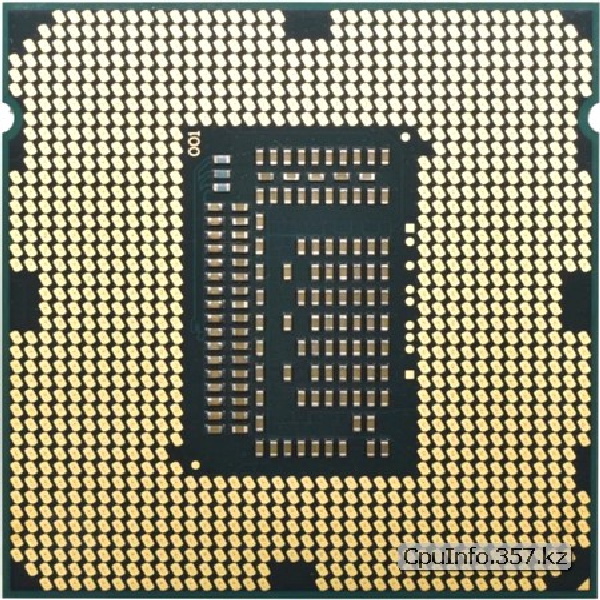
Intel Xeon E3-1265L V2: back-side photograph and contacts
Examining the contact side
The back-view photograph of Intel Xeon E3-1265L V2 shows the processor substrate and its electrical contact area. Package and contact designs vary by processor family. Visual inspection can reveal obvious contamination or mechanical damage, but it cannot confirm that every connection works correctly or that the processor will initialize in a computer.
Why the socket matters
Specified socket: the socket listed in the specification table. Processors from different Intel families can share similar exterior dimensions without being interchangeable. Always compare the board socket, keying, supported CPU list and BIOS requirements. Do not attempt to install a processor using force when alignment or compatibility is uncertain.
Safe inspection before installation
Before fitting E3-1265L V2, inspect the motherboard socket and the processor contact surfaces under good lighting. Avoid touching exposed contacts unnecessarily. Check for contamination, damaged pads, bent socket contacts and signs of prior repairs. Follow suitable electrostatic-discharge precautions when handling loose PC components.
How contacts relate to CPU specifications
The electrical interface connects the processor to motherboard power, memory and communication signals. Published model specifications tell you which platform to use; the photograph only illustrates the package and its physical connection surface.
Using the photograph for comparison
Compare this image with the front-side photograph and the detailed specification table for E3-1265L V2. The reference also provides CPU-Info Benchmark scores and neighboring processors. These calculated results help organize model comparisons but do not constitute an on-device performance test or a diagnosis of a processor's condition.